2026 Redesign - Immersive Viewing Experience
February 2026 - Complete UX overhaul focused on letting the photos shine:
Navigation System Redesign
- Floating navigation buttons: Transparent circular prev/next buttons positioned over the image, staying out of the way until needed
- Keyboard navigation: Arrow keys for quick gallery browsing (desktop)
- Touch gestures: Swipe left/right to navigate galleries (mobile)
- Streamlined menu: Cleaner overlay navigation with no distracting icons, closes when you click outside
Visual Design Refresh
- Modern Warm Dark palette: Coral (#ff9e9e), berry (#d84a6f), and peach (#ffc799) accents on warm near-black backgrounds
- Redesigned gallery cards: Subtle elevation with border glow on hover, matching the new color palette
- Enhanced pagination: Better contrast and mobile-responsive sizing
- Topic pill badges: Clean, rounded badges that transform on hover
Gallery Improvements
- Single gallery pages: Full viewport immersive image view with metadata section below
- Multi-image topic views: Improved thumbnail resolution and consistent layouts
- Styled headers: Bordered section headers for topic pages
- Filtered listings: Shows section excludes concert photography to focus on daily photos
Mobile Optimization
- Responsive floating nav buttons positioned in visible areas
- Touch-friendly button sizing
- Adaptive layouts for all screen sizes
Float main menu over images to increase image are on main display pages (December 2024)
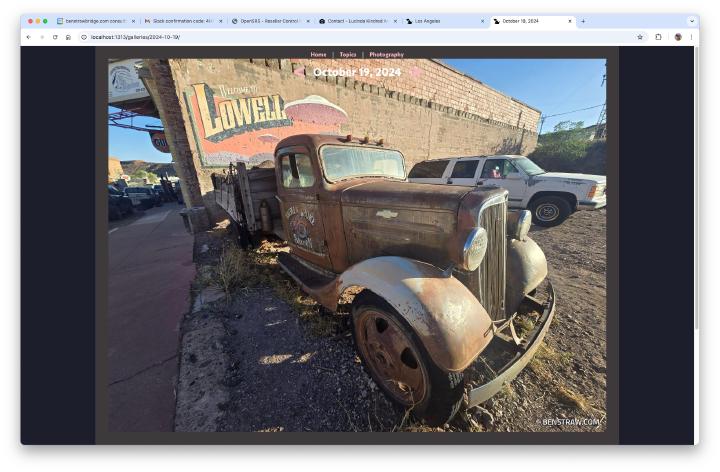
Add a Related topics menu to each term page
On term pages show a menu with a link for all of the topics referenced in each image in that term.
New homepage with main day image and top topics featured
Custom opengraph images for sharing content
These images are generated on build with the page title (which is the date) and the site title.

Watermarking of images with site url
I used the gallery deluxe configuration to add watermark images to the large images used on the site. I just created a transparent .png, then added the following configuration to my hugo.toml configuration file.

[params.gallerydeluxe.watermark]
  image = "images/benstraw.png" # relative to /assets
  posx  = "right"   # one of "left", "center", "right"
  posy  = "bottom"  # one of "top", "center", "bottom"
Addition of paging arrows to gallery views
The single image galleries all have had paging arrows, but the default gallery from the gallery deluxe plugin only had swipe paging, mostly targeted to mobile devices. These are the topic and category galleries that open larger images and allow going through all the images in a single gallery. The addition of subtle left and right carots overlaying the image allowed for easier paging with a mouse.
Screenshot of gallery paging

Initial Launch August 19, 2024
On the inital launch the home page was the list of all the galleries in the /galleries directory. I had not made many additional modifications to the galleries deluxe theme yet, with the exception of adding the topics and the changes I made to the nav and footer to support topics in the theme.
Screenshot of initial launch
